From a fully loaded 68060 to a PiStorm, PowerPC machines or an imagined RISC-V workstation—it's the platform that brings the community together.
The Team wants AmigaChrome, OpenUp and the OPEN family to support powerful classic Amigas, use modern accelerators and grow onto new hardware without breaking the community apart. The Team's future A1200-style machine would keep one inexpensive case I/O board and swap the complete compute carrier through the proposed AC-EDGE-1 connector. Every hardware path still has a real technical status: built, being qualified or on the drawing board.
PreserveKeep the high-end classic Amiga aliveAcceleratePiStorm, PPC and modern ARM/x86 computeExploreA native RISC-V Amiga for the future
Every part of the family matters
Classic muscle. Modern cores. One shared direction.
Supporting a chip family, booting an Amiga guest and qualifying the exact physical machine are different milestones. Here's the platform story without pretending all six paths are equally finished.
Classic reference
High-spec M68K Amigas
A1200, A3000 and A4000-class systems with 68040 or 68060, FPU, substantial Fast RAM, RTG, modern storage and networking. These are machines worth developing *for*, not just emulating.
The Team's target assumes a 68040 + FPU when designing capable software. Particular 68060, RTG, accelerator and OS combinations still need application and hardware qualification.
The established community PiStorm family connects Raspberry Pi compute to classic Amigas. The Team's PiStorm32-lite A1200 appliance approach adds Cradle-built cards and a managed first-run hardware check.
PiStorm and Emu68 exist today. AmigaChrome's A1200 bus/image checks have passed simulation, but a complete real PiStorm A1200 AmigaChrome deployment remains unqualified.
From BlizzardPPC, CyberStormPPC and classic WarpOS/PowerUP history to AmigaOS 4 systems. The Team's PPC460 Sam460ex core and block JIT have booted OS4.1 FE in development.
A PPC guest boot does not mean physical PPC expansion cards or every AmigaOS4 board are supported. Classic PPC compatibility faces are engineering work.
An x86-64 host runs AC090's JIT, many AmigaOS guests, graphics services, build tools, tests and appliances. A fast x86-64 machine makes a very good AmigaChrome lab. The MMU view is on by default since 12 October: it is safe, and its speed gain needs a second phase.
This is a working host/runtime pathway, not a claim that x86-64 is a physical A1200 motherboard.
AC090 has an ARM64 JIT implementation; Raspberry Pi 5 Workbench and appliance tests are recorded. A compact, efficient ARM host offers new possibilities for portable AmigaChrome installations.
ARM64 JIT checks under QEMU and a Pi 5 boot do not establish identical performance or I/O compatibility across every Pi or PiStorm board.
A future RISC-V daughtercard could plug into the same proposed AC-EDGE-1 connector as an ARM carrier. The off-the-shelf module brings the CPU and RAM; its replaceable carrier brings NVMe, power and video adapters.
The universal connector is a design proposal, not a pinout or proven fit. No qualified AmigaChrome RISC-V A1200 module, native OPEN kernel or 32-core Nursery cluster has shipped.
Available hardware isn't the same as certified software.
The Team is building to the OPEN contracts and measuring what genuinely works. The AmigaChrome-specific release gates still matter for memory maps, graphics, disk safety, real buses, input, interrupts and application compatibility.
ONEPlatform philosophy. Different hardware readiness.
The machines already in owners' hands
The classics don't need permission to have a future.
A properly specified 68040/060 Amiga and an accelerator-rich PowerPC system deserve first-class software.
The design is one small firmware on every tier. On a real Amiga it sits in the Kickstart ROM and loads the open libraries' 68k builds from disk. Optional host services speed up the right work, and a useful 68k path stays for machines without the latest board.
On PiStorm, the Team also wants cautious, reversible setup: checks before taking over the bus, reports for failed hardware gates and a way back to an owner's existing software. Real hardware proof is still outstanding for the Team's image.
Two case docks. One carrier family. Upgrade the brain, not the machine.
Choose an authentic A1200-style wedge case or a micro-ATX-compatible desktop enclosure. A low-cost, permanent USB and rear-connector dock stays in the case. Change the compute carrier, not the keyboard or ports, to move between supported ARM, RISC-V and eventual x86 module families. Both case layouts and their shared AC-EDGE-1 connector remain proposals, not validated hardware.
What makes it affordable? The fixed case board is not another fully featured computer. It's essentially a powered USB distribution board and rear I/O breakout. The module carrier handles the expensive, processor-specific hardware: the module socket, M.2 NVMe, local power conversion, video translation and cooling.
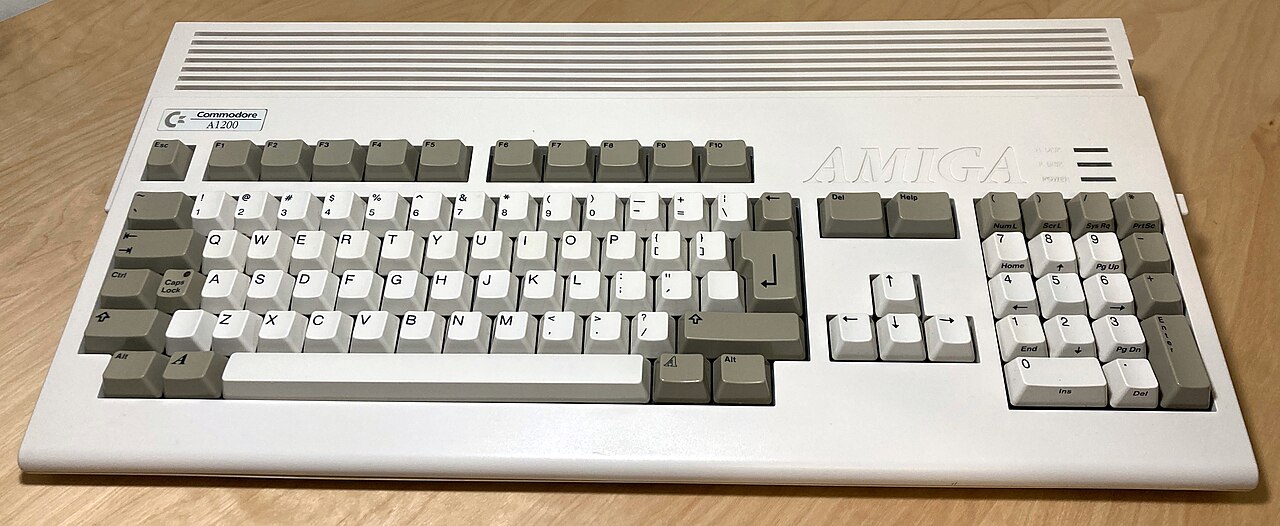
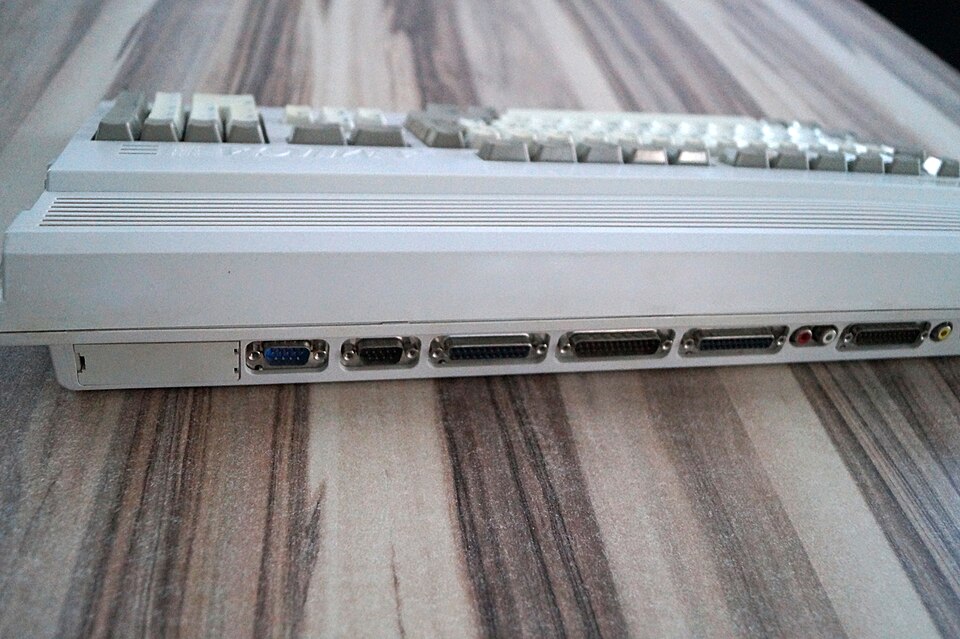
01 · Original A1200 — top viewThe actual keyboard, numeric keypad, ventilation grille and A1200 wedge proportions. Photo by Jcassara86, CC BY-SA 4.0 (unmodified Wikimedia Commons photograph).02 · Original A1200 — rear viewThis is the real connector face and shell shape, not the new proposed I/O layout. Photo by Werner Ziegelwanger / Wikimedia Commons (Public Domain Mark; unmodified).
These are photographs of actual Commodore A1200 computers—not rendered future products. The following electronic layouts are HTML/CSS design diagrams only, using the original enclosure as their mechanical reference.
01 / ALWAYS FITTED · COMMON TO EVERY CPU GENERATIONLOW COST
A1200 case connector boardCustom USB dock + rear breakout
HDMI-C 1Mini-HDMI rear
HDMI-C 2Mini-HDMI rear
USB-C PDPower input
USB-A ×2External USB
DB9RS-232 serial
USB × 4Internal header ports
On the inexpensive fixed board: powered USB hub, four internal USB2 header ports, ESD protection, safe power-input control and controlled-impedance video pass-through. The A1200 keyboard scanner is a separate plug-on USB adapter. No host SoC, GPU, host RAM or NVMe controller on the dock.
↓
02 / AC-EDGE-1 · ONE KEYED CASE-TO-CARRIER CONNECTORDefined USB host link(s) · separate video lane groups · protected power · ID and control · common carrier envelope with latch and retention
↓
03 / REPLACEABLE PROCESSOR CARRIERSpend the development money here
Compute moduleCM5-style footprint or alternate documented module socket
ARMRISC-Vx86*
NVMe / PCIeShort trace to module
DC/DC + protectionModule-specific power
Video adapterOnly if needed
CoolingTrapdoor envelope TBD
*An x86 carrier is feasible only when a suitable module or compact board supplies the required USB host, video outputs, power budget and mechanical fit. This connector is a proposed new standard; a CM4/CM5 physical socket alone does not make other vendors' modules electrically interchangeable.
One interface. Two case docks.
A1200 at the desk. mATX in a tower.
Choose the classic keyboard-wedge case or a normal micro-ATX-compatible enclosure. Both use the proposed AC-EDGE-1 case-to-carrier contract, so the processor, NVMe and expensive adaptation remain on the removable carrier.
AC-DOCK-A1200A shaped rear I/O assembly, original keyboard and floppy-bay space, with the compute carrier near the trapdoor. Exact clearance, mounting and cooling remain unproven.
AC-DOCK-MATXThe same dock concept on a micro-ATX-compatible mounting plate, rear I/O insert and front-panel harnesses. Service the carrier through the case panel. More space, not an automatic PC chipset or PCIe slot.
Shared carrier familyOne proposed base-envelope interface, two mechanical layouts. Larger or higher-power mATX-only carriers must be explicitly labelled; electrical and physical interchangeability still need testing.
One safe power sourceQualified external USB-C input by default. A PC case does not imply an ATX 24-pin input. Any ATX/SFX supply adapter needs a separate protected power path, not supplies wired together.
Four internal ports. A tiny plug-on keyboard adapter.
Useful expansion without another motherboard.
Both dock designs reserve four internal USB 2.0 ports, preferably on four separate keyed single-port headers. They are ordinary USB peripheral connections, independent of whether the compute carrier is ARM, RISC-V or x86.
INT_USB1
Keyboard module
A small, separate A1200 keyboard adapter pushes onto the header through a female socket underneath. Optional on mATX; no processor-carrier GPIO wiring.
INT_USB2
Bay / front socket 1
Connect a short harness to the first internal floppy-bay USB socket, or to a front-panel socket in the mATX version.
INT_USB3
Bay / front socket 2
The second bay or front-panel connection. These sockets use the header ports; they are not extra USB channels counted twice.
INT_USB4
Spare accessory
One internal port remains available after the keyboard and two bay connections. For a future accessory within the approved power budget.
Ports versus connectors: a conventional nine-pin PC USB2 header serves two ports. Two such blocks are an alternative way to provide these same four ports, especially for mATX case cables. Four conventional dual-port blocks would mean eight ports, which is not this base design. Connector pinout and keying are not final. Manufacturer example of two headers / four ports.
Separate AC-KBD-USB adapter
Original keyboard ribbon to a compact active scanner; USB HID firmware to a keyed female socket on INT_USB1. The adapter stays with the case through processor upgrades. A support and ribbon strain relief stop it levering or shorting the header pins.
A small module, not just a wire
Keyboard matrix scanning, debounce, Amiga-key mapping, Caps Lock LED and USB reports need a microcontroller and firmware. Fit it with power disconnected. Existing A1200-to-USB adapters are useful prior art, not proof of the Team's proposed plug-on dimensions or a right to copy their design.
Budget the hub correctly: four internal ports + two rear USB sockets + one USB serial bridge = seven downstream functions on either base dock. The mATX front sockets reuse INT_USB2/3. A seven-port Hi-Speed USB2 hub is one reference option; the actual hub, current budget and any rear SuperSpeed support remain to be selected and tested. Bandwidth and power are shared, not unlimited.
The Team's strengths are the interface contract, firmware, device identity, keymaps, Cradle provisioning and repeatable software tests. Bought compute modules remove the need to design a CPU and DDR subsystem. The dock still needs electronics review for power, protection, USB/HDMI routing and connector integrity, plus actual mechanical and thermal tests.
Real case. New rear I/O insert.
Rear connectors and the original floppy bay.
No legacy PCMCIA or parallel interface on this new system. The A1200's original case geometry is preserved as the reference; a replaceable rear insert or breakout adapts its openings rather than pretending the historic DB25 and video connectors magically became HDMI.
2 × mini-HDMI Type CTwo physically fitted rear sockets. Independent video source(s) must be delivered by the installed carrier; unsupported outputs stay inactive and labelled.
USB-C power inputUSB Power Delivery input on fixed board with suitable negotiating, protection and current-rated contacts; carrier converts to module-specific rails.
2 × USB-A + DB9 serialTwo hub-fed rear USB sockets and a USB-to-RS-232 serial bridge. DB9 receives real RS-232 signal levels, never bare 3.3V UART.
4 × internal USB2 portsINT_USB1 for the plug-on keyboard module; INT_USB2/3 feed the A1200 floppy-bay sockets or mATX front sockets; INT_USB4 stays spare. Preferred layout: four keyed single-port headers.
Swap the carrier, retain the case
ARM as the first carrier target. RISC-V and x86 after qualification.
CM5ARM reference
55 × 40 mm module; four Cortex-A76 cores, two native HDMI outputs, USB 3 and PCIe for NVMe on its carrier.
RV64Future carrier
A future RV64 compute module. None has been chosen or qualified. Its USB host, video outputs, power and fit must meet AC-EDGE-1; an output it cannot drive stays inactive.
x86Future carrier
Match a module's USB host, graphics outputs, input power and thermal envelope. No universal socket or compatible carrier has been validated yet.
One edgeCase-side contract
Stable mechanical outline and signal families; processor-specific logic stays on the replaceable carrier. No live insertion.
Unlike a USB-C dock, standard USB alone does not carry arbitrary native HDMI signals. The edge connector needs separate impedance-controlled video routes, or a formally supported DP Alt Mode/USB4 contract. It also needs ESD protection, grounding, appropriate power-contact ratings and signal-integrity testing.
CONCEPTUAL A1200 FIT STUDYNOT CAD · NOT TO SCALE
REAR EDGE · HDMI-C ×2 · USB-C POWER · REAR USB ×2 · DB9 SERIAL
LEFT SIDE no PCMCIA
LOW-COST CASE I/OUSB hub + rear breakout + edge connector
CARRIER LINK → trapdoor below
RIGHT SIDE bay sockets from INT_USB2/3
A1200 KEYBOARD → SEPARATE PLUG-ON USB HID MODULE → INT_USB1 · KEEP MEMBRANE / MOUNTING CLEARANCE
UNDERSIDE TRAPDOOR · CANDIDATE MODULE + NVMe LOCATION · FIT, THERMALS AND SERVICE ACCESS UNPROVEN
04 · The physical plan is an independent HTML/CSS diagram. A new case-board rear edge and the underside trapdoor carrier replace the old full-width processor PCB concept. Mechanical drawings, mounting points, flex/cable paths, heatsink clearance, airflow and rear panel tooling remain to be measured.
Design for inexpensive ownership
Spend once on the case. Spend again only when compute improves.
Economics come from keeping the permanent board small and repeatable: no RAM, expensive processor, new storage controller or large populated motherboard underneath the keyboard. The user retains the A1200 shell, keyboard, rear board and hub when replacing a removable carrier. Components like USB hubs, connectors, ESD/PD circuitry, mechanical insert and high-speed PCB routing still cost money and must be quoted—this is a low-cost design target, not a confirmed bill of materials.
FIXEDSimple repeatable I/O PCB, USB hub, four internal header ports, rear connectors and safe power. Keyboard HID is a separate plug-on module.
SWAPPABLEModule socket, PCIe / NVMe, adapters, DC/DC and cooling
OFF THE SHELFThe actual processor and memory come ready-made from module vendors
Concept disclaimer: Board, carrier, connector and case-layout visualisations on this page are based on design principles and the form factor of a genuine Commodore A1200, not actual proposed hardware. The diagrams are HTML/CSS design studies—not CAD, an electrical pinout, confirmed fit, a finished PCB or a manufactured product. The separately labelled photographs of the original A1200 are genuine reference photos. Fit beneath the A1200 trapdoor, rear connector placement, power, video bandwidth and module compatibility all require physical measurement and engineering validation.
Performance and electrical power · ground the dream in reality
RISC-V is already more than a small development board.
It's useful to separate a low-power desktop concept from a heavy many-core workstation. The following *real* chip families illustrate the range, without claiming they're supported AmigaChrome configurations.
REAL SILICON · EIGHT-CORE ENERGY-EFFICIENT CLASS
8 cores
SpacemiT K1 / Milk-V Jupiter family
SpacemiT's K1 is an eight-core 64-bit RISC-V SoC with vector extensions. The chip maker's product brief gives a 3–5 W chip TDP—not the total consumption of a complete computer, display, SSD or PCIe devices.
A real-world reference for a compact, quiet workstation concept. Actual AmigaChrome performance on this board has not been measured.
Milk-V's Pioneer developer motherboard uses a 64-core SG2042 up to 2 GHz, PCIe expansion and up to 128 GB RAM. The manufacturer quotes about 120 W typical chip power, with cooling and whole-system consumption additional.
A real performance scale to learn from, not an AmigaChrome benchmark or a promise that a 68040 application runs 64 times faster.
Vary how much of a job can genuinely run in parallel, then choose cores. This uses Amdahl's law to illustrate the *best possible scaling* before memory, scheduling, service transport or software overhead.
Not a benchmark; not a 68040-versus-RISC-V comparison. Sequential UI/Exec work may not speed up at all. Independent audio, encoding and media kernels are more promising.
Cores available
4.71×Ideal upper bound for the *same workload*, compared with one identical core. More cores cannot eliminate the sequential part.
90% parallel work on 8 identical cores produces a theoretical upper bound near 4.71×, not an empirical result.
Frequency needs context. Eight 2 GHz cores amount to up to 16 billion aggregate core clock cycles per second if every core runs at that clock. That is not a single 16 GHz CPU, not 16 billion guaranteed instructions, and not a conversion into equivalent 68040 MHz. Real workloads depend on instructions per clock, memory bandwidth, JIT, software, I/O, temperature and the cost of moving data.
One more exciting machine to imagine
A Nursery of 32 RISC-V cores.
Your A1200 asks for help. A cluster answers. The Amiga remains in charge.
The existing Nursery proposal describes four eight-core RV32 nodes, coordinated by Cradle, with named services for TLS work, media decoding, document rendering and other independent jobs. It's a compelling thought: even a classic Amiga could dispatch the right task to a much larger compute fabric.
At a speculative 2 GHz/core, 32 cores would represent 64 billion aggregate clock cycles per second under full clock, not one 64 GHz CPU. Gigabit networking, job size and serialization can erase the benefit of dispatching tiny work.
The 32-core RV32 Nursery is documented as a proposal, not assembled or benchmarked hardware. The standalone eight-core RV64 workstation above is a distinct proposed direction, not a finished product.
32 speculative compute cores · a future Nursery service fabric · cluster scheduler, native code, fault handling and hardware validation still to do.
Built / Qualifying / Dreaming
Make the roadmap as dependable as the ambition.
The goal isn't a list of unsupported checkboxes. It's a growing collection of compatible targets with repeatable builds, real guest tests, genuine hardware validation and honest release notes.
Built or recorded in development
The foundation
AC090 interpreted and x86-64 JIT paths, ARM64 JIT implementation.
x86-64 Cradle instances and recorded Raspberry Pi 5 Workbench boot.
PPC460/Sam460ex AmigaOS 4.1 guest development boots.
openmulticore.library 0.4, openservice.device, and native bodies for utility and the IEEE maths.
Cradle images, snapshots, tools and evidence gathering.
Under integration / qualification
Hardware proof
Physical PiStorm32-lite A1200 AmigaChrome startup, I/O and storage safety.
High-spec 68040/060 and RTG card compatibility matrices.
Physical PPC and classic WarpOS/PowerUP library faces.
Repeatable native ARM64 benchmarks and device support.
Game/app performance measurements on actual targets.
Concept / research horizon
Where it could lead
New eight-core RV64 Amiga-inspired workstation.
32-core RV32 Nursery cluster and distributed services.
Native RISC-V OpenGPU, device, compiler and compute backends.
A separate custom OPEN operating environment.
Open replacements for exec, dos and the firmware's core.
The Team does not distribute commercial Kickstart, AmigaOS or proprietary accelerator firmware by virtue of writing software that might work with them. Third-party rights, hardware/vendor branding and toolchain licences remain separate.
One team · One platform · One purpose
Decades of engineering experience. Modern software development. Rigorous testing. One goal: to give the Amiga the future it deserves.
Human architected. AI tested. Team delivered.
Everyone has a place in this future
Don't leave any generation behind.
Give the great Amigas new software. Give the new processors something worth running. Reunite the platforms around OPEN standards—and build what comes next together.


.jpg)